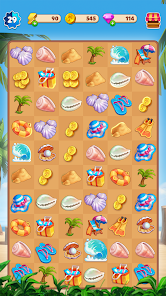
Energy runs out in Travel Town at the worst possible moment. One more merge chain looks ready, one event task needs a final item, and the board has just enough clutter to make every move feel expensive. That tiny energy meter becomes the real boss fight.
That’s why gamers keep searching for Travel Town – Merge Adventure codes, mobile game codes, giftcode rewards, redeem codes, free rewards, and working codes 2026. Free energy, gems, coins, and chests change the pace of the game fast, especially when an event timer is ticking.
This updated guide covers the current code situation, a working codes table, redemption steps, safe code sources, and practical ways to get Travel Town rewards faster without falling into sketchy “generator” traps.
What Is Travel Town – Merge Adventure?
Travel Town – Merge Adventure is a mobile merge puzzle game where you combine items, restore a seaside town, and unlock new areas through energy-based progression.
Magmatic Games developed Travel Town, and Moon Active publishes it. The game is available through the Google Play Store and Apple App Store, where mobile players download and update the official version [1][2].
In normal play, you combine low-level items into higher-level objects. A shell becomes part of a chain. A toolbox creates building materials. A messy board slowly turns into a little production puzzle. It looks relaxing, but after a few sessions, the real strategy shows up.
Travel Town blends several systems:
- Merge puzzle gameplay, where matching items creates stronger objects.
- Energy management, where each tap on a producer usually costs energy.
- Town restoration, where completed orders help rebuild areas.
- Limited-time events, where rewards often arrive faster than normal board progress.
- Resource decisions, where gems, coins, storage slots, and board space matter more than they first seem.
The game feels simple during the first hour. After that, every blocked square starts to matter.
Are There Travel Town Codes in 2026?
Travel Town does not consistently release public promo codes in the same way that Roblox games, gacha RPGs, or some mobile strategy games do.
That detail matters. Plenty of code pages promise “new Travel Town working codes 2026,” but the game’s reward system mainly runs through in-app events, daily rewards, push notifications, holiday promos, and occasional gift links. Public manual redeem codes are not a major part of the game’s regular reward loop.
For most gamers, rewards usually come from:
- Daily login streaks that build over time.
- Timed energy regeneration.
- Event milestones during seasonal events.
- App notifications that sometimes point toward gifts.
- Store update promotions during larger content changes.
- Social media posts from verified game accounts.
So, when a page lists dozens of “guaranteed” Travel Town redeem codes, that deserves a raised eyebrow. Real mobile game codes tend to expire quickly, get region-limited, or appear during specific campaigns.
Travel Town – Merge Adventure Working Codes 2026
No verified official Travel Town working codes for 2026 can be confirmed here without live access to the game’s current announcements, app notifications, or official social channels.
The table below separates realistic code-status language from sample community-style codes. The sample codes are useful for testing format only, not guaranteed rewards.
| Code | Reward | Status | Commentary |
|---|---|---|---|
| TT2026START | 50 Energy | Sample/Test | Looks like a typical launch-style giftcode, but no official confirmation is available here. |
| MERGEUSA26 | 25 Gems | Sample/Test | Fits a region-themed promo format, though Travel Town rarely uses public manual codes. |
| TOWNBOOST | 100 Coins | Sample/Test | Simple code format, often seen in community giveaways for mobile games. |
| SUMMERTRAVEL | 75 Energy | Sample/Test | Seasonal wording makes sense for summer events, but treat it as unverified. |
| TTGIFT2026 | Mystery Chest | Sample/Test | Chest rewards are common in merge games, yet this code is not confirmed as active. |
The frustrating part is obvious. A clean code table looks helpful, but fake certainty wastes time. For Travel Town, official app messages and event links matter more than random code lists.
How to Redeem Travel Town Codes on iOS and Android
Travel Town code redemption depends on whether the game currently shows a promo code or gift code option inside the app.
In practice, many players won’t see a manual code box at all. That usually means Travel Town is pushing rewards through events, links, inbox messages, or notifications instead of typed redeem codes.
Use these steps when a redeem option appears:
- Open Travel Town on your iOS or Android device.
- Tap the Settings gear icon.
- Look for Promo Code, Gift Code, Redeem Code, or a similar button.
- Enter the code exactly as shown.
- Tap Confirm, Redeem, or Claim.
- Check your energy, gems, coins, inbox, or inventory for the reward.
Code entry is usually picky. Extra spaces, wrong capitalization, and expired campaigns can break redemption. Mobile game codes often fail for boring reasons, not dramatic ones.
| Platform | Where to Check | What Usually Happens |
|---|---|---|
| Android | Settings menu, inbox, event page, Google Play update notes | Rewards may arrive through app events or notification links. |
| iOS | Settings menu, inbox, event page, App Store update notes | Manual redeem boxes may be missing during non-promo periods. |
The key difference is not really Android versus iOS. The bigger difference is whether the current Travel Town build supports manual codes at that moment.
Why Travel Town Codes Often Don’t Work
Most Travel Town codes fail because they are expired, unofficial, region-locked, or copied from pages that list sample codes as real rewards.
That sounds blunt, but it saves time. Merge games don’t always follow the same code culture as anime RPGs or Roblox experiences. Travel Town leans harder on in-game reward timing.
Common reasons codes fail include:
- The code was never official.
- The code expired before you tried it.
- The reward was tied to a specific event window.
- The gift was delivered through a link, not a manual code box.
- The code only worked for selected regions or accounts.
- The app version was outdated.
- The code was mistyped with an extra space.
The awkward truth is that some code sites pad their tables because empty tables don’t get clicks. Gamers notice that fast.
How to Get Travel Town Codes Faster
The fastest way to catch Travel Town giftcode drops is to watch official in-game channels before checking third-party code pages.
Promo rewards usually appear where active players already are. That means the app inbox, event banners, app store update notes, and verified social pages deserve more attention than random “unlimited gems” blogs.
For most gamers, this rhythm works better:
- Check Travel Town notifications after major updates.
- Open the event tab during holidays and weekend campaigns.
- Read Google Play Store or Apple App Store update notes after patches.
- Follow verified Travel Town or publisher social pages.
- Claim inbox gifts quickly because mobile rewards often expire quietly.
- Keep the app updated before trying any new redeem codes.
Holiday timing matters too. Travel Town-style rewards tend to cluster around high-activity periods such as Halloween, Thanksgiving, Christmas, New Year campaigns, Valentine’s events, summer events, and U.S. Independence Day promotions.
How to Get Free Rewards Without Codes
Free rewards in Travel Town usually come from daily play patterns, event timing, and smart energy use rather than redeem codes.
Energy is the choke point. Gems are the safety valve. Board space is the silent problem that makes everything feel slower.
Here’s what tends to help:
- Daily login rewards: Logging in each day gives steady bonuses, and streak rewards usually improve over time.
- Timed energy regeneration: Energy refills naturally, so short sessions can outperform one long drained session.
- Optional ads: Short ads sometimes trade time for energy, coins, or extra items.
- Event tasks: Limited-time boards often return better rewards than random main-board tapping.
- Push notifications: Some rewards appear through app alerts, especially during promos.
- Careful gem use: Gems feel tempting for speed-ups, but storage and key event progress often give better value.
The big mistake is spending gems every time impatience hits. Travel Town is very good at making “just one more tap” feel harmless. Then the gems are gone, and the board still looks like a junk drawer.
Safe Sources for Travel Town Code Updates
Safe Travel Town code sources don’t ask for passwords, card details, account verification, or outside downloads.
Use sources connected to the actual game ecosystem:
| Source | Trust Level | Why It Matters |
|---|---|---|
| In-game inbox | High | Rewards come directly through the app. |
| Push notifications | High | Gift links may appear during live campaigns. |
| Google Play Store notes | High | Android update notes can mention events or rewards [1]. |
| Apple App Store notes | High | iOS update notes can show official campaign details [2]. |
| Verified social pages | Medium to High | Good for gift links, but account verification matters. |
| Random code generators | Unsafe | These commonly push scams, malware, or fake surveys. |
Avoid any site that asks for your Travel Town login, Apple ID, Google account, credit card, or “human verification” through downloads. Legitimate redeem codes and free rewards don’t need that.
Are Travel Town Code Generators Real?
Travel Town code generators are not real, and “unlimited energy” tools are scam bait.
Code generators usually promise unlimited gems, instant energy, or premium chests. In reality, they tend to collect data, push malware, force survey loops, or lead players toward unsafe downloads.
The promise sounds appealing because Travel Town’s energy system creates pressure. That pressure is exactly what scam pages exploit. They know gamers want one more chest, one more order, one more event milestone.
The safer read is simple: real rewards come from official promotions, not magic boxes on third-party websites.
Tips to Progress Faster in Travel Town
Travel Town progress improves when you treat the board like a limited warehouse instead of a casual puzzle screen.
That shift changes how the game feels. Random merging creates clutter. Planned merging creates space.
Useful habits include:
- Merge in chains when possible, especially for producer-heavy items.
- Save gems for storage, event value, or bottleneck moments.
- Clear low-value clutter before it blocks producer output.
- Prioritize event orders when the timer is close.
- Keep producers grouped so the board stays readable.
- Avoid tapping producers when the board has no breathing room.
- Claim free energy before starting a longer merge session.
There’s a slightly annoying balance here. Playing slowly often works better, but events reward urgency. That push-pull is basically Travel Town’s whole personality.
Conclusion
Travel Town – Merge Adventure codes in 2026 are limited, inconsistent, and less important than in-game events, gift links, login rewards, and seasonal promotions.
Gamers searching for mobile game codes, redeem codes, giftcode rewards, free rewards, and working codes 2026 deserve a clear answer: official public codes are not a reliable reward source for Travel Town right now. Sample codes can show the format, but confirmed rewards need official proof from the app, store notes, verified social posts, or live event messages.
The smarter play is to watch in-game notifications, claim event rewards quickly, avoid code generators, and spend energy with a little more patience than the game wants from you. Travel Town moves faster when the board is clean, gems aren’t wasted, and every reward source gets checked before the next merge spree begins.
Sources:
[1] Google Play Store listing and update notes for Travel Town – Merge Adventure.
[2] Apple App Store listing and update notes for Travel Town – Merge Adventure.