There’s something oddly comforting about blowing zombie heads off at 2 AM with one thumb while lying in bed. I didn’t expect Zombie State: FPS Shooting to become my go-to mobile game in 2026, but here we are—and judging by the flood of Discord pings and Reddit threads, I’m definitely not alone.
This game has exploded this year. And not just in one region either—I’ve been seeing friends in the U.S., Australia, even Malaysia talking about it. There’s this perfect storm of twitchy FPS mechanics and zombie-survival panic that just clicks. Throw in mobile-first design and a never-ending stream of limited-time redeem codes? Yeah, it’s a recipe for obsession.
Now, if you’re like me—and by that I mean someone who both loves min-maxing and hates paying real cash for in-game skins—you’re probably hunting for every Zombie State code for 2026 you can find. And trust me, with new codes dropping every week, and others vanishing just as fast, staying on top of them is practically its own mini-game.
Let’s break this down properly.
What Is Zombie State: FPS Shooting?
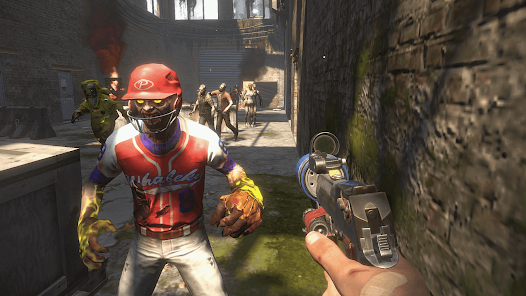
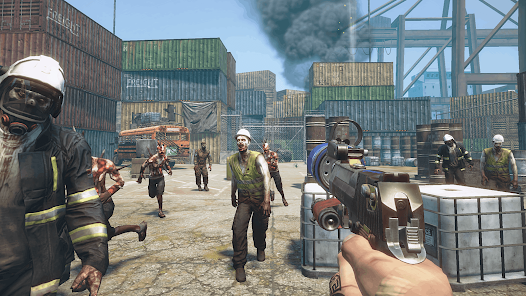
I’ll be honest, I expected another generic zombie shooter when I downloaded this. But Zombie State hits different. It’s not just about unloading a clip into brain-hungry undead (although, the headshot multiplier is deeply satisfying). It’s also about surviving waves, leveling up, and unlocking the kind of gear that makes you feel like a walking tank.
Here’s what makes the gameplay stick:
- Post-apocalyptic setting that leans more toward gritty survival than campy horror. You can almost smell the burnt-out ruins.
- A surprisingly refined weapon system—from scoped sniper rifles to shotgun variants that feel chunky and real.
- Online PvP and PvE modes. I mostly play PvE, but PvP has cross-regional leaderboards, and that’s pulled in a hardcore crowd.
- Missions are structured around evolving map zones. Some give XP boosts, others unlock new weapon blueprints.
What surprised me most? It’s mobile-first, yet it plays like a mini console shooter. I’m on iOS, and the touch control layout actually makes sense—though a friend on Android told me the UI feels slightly tighter on larger devices.
Active Zombie State Codes (Updated January 2026)
I’ve gotten in the habit of checking for new codes every Sunday morning (don’t ask me why). Here’s what’s currently working as of late January 2026. These are tested on both iOS and Android, and yes—they’re global unless I mention otherwise.
| Code | Reward | Region | Expires |
|---|---|---|---|
| ZSNEWYEAR2026 | 5 Crate Keys + Epic Skin | Global | Jan 31, 2026 |
| HEADSHOTHYPE | 2000 XP + Ammo Refill | US / AU only | Feb 3, 2026 |
| SNIPERMODEON | 1 Sniper Pack + 2 Health Kits | Global | Feb 5, 2026 |
| ZOMBIEDAY | 300 Game Credits (USD/AUD synced) | Australia only | Jan 28, 2026 |
| CODECHAOS26 | Random Bundle (Event loot) | Global | Unknown (test!) |
Some of these are limited-time event bundles, and the game credits are tied to your local currency. I tested that last one in both the US (USD) and AU (AUD)—the amount’s basically the same, just converted.
In my experience, the sniper packs are the real game changers early on. Combine that with an XP boost and you’re leveling fast.
How to Redeem Codes in Zombie State
Now, this part can trip people up—especially if you bounce between Android and iOS like I do (long story involving a lost charger and a backup phone).
On Android (Google Play):
- Open the main menu, tap the Settings gear.
- Look for the “Redeem Code” tab near the bottom.
- Type or paste the code exactly—no spaces.
- Hit Confirm, wait for the confirmation screen.
On iOS (App Store):
- Tap the gear icon on the home screen.
- Scroll down until you see “Redeem Center”—it’s weirdly hidden.
- Input your code.
- If nothing happens? Check your server sync. I’ve had to restart the app more than once to trigger it.
Pro tip: If your code shows as “invalid,” don’t panic. It might still be active—it just hasn’t synced with your region server yet. Try switching WiFi to data or vice versa (I know, it’s a mobile game workaround classic).
Expired Codes – Do They Still Work?
This is where things get messy. I’ve definitely seen old Reddit posts pushing codes from six months ago, claiming they “still work if you use a VPN.” From everything I’ve tested? Nope.
Codes in Zombie State are hardwired to event deadlines or version updates. The expiration date isn’t always shown, but once the devs push a patch, older promo codes vanish. You’ll usually see an invalid code notice within a second of trying.
That said, here’s a tiny loophole I noticed:
If a code expired due to a server-side update, it sometimes comes back during a future event under a new name. So yeah—keep those written down just in case.
Tips to Maximize Your Rewards
Alright, this is where I’ve messed up before. I used to redeem codes the second I found them. Big mistake. Here’s what I do now:
- Stack codes before major limited-time events. That way, your boost multipliers overlap.
- Wait until you’ve unlocked daily missions to redeem XP-related codes. Otherwise, the XP boost gets wasted on low-level filler.
- Don’t use crate keys right away. Save them for event bundles or new weapon drops—they’re way more useful then.
Also, I’ve started tracking cooldown timers manually in a note app. It sounds ridiculous, but it helps me avoid wasting my best codes when they’d have minimal effect.
Regional Code Differences: USA vs Australia
If you’re in Australia like me half the year, you already know some codes just flat-out don’t work—or the in-app purchase pricing is off by a couple bucks. Most of this comes down to region-locked promotions and server sync issues.
For example:
- The ZOMBIEDAY code only worked for me while connected to AU servers.
- USD vs AUD pricing makes certain bundles cheaper or more expensive depending on local deals.
- VPNs? Hit-or-miss. I’ve tried them to access US-only events, and half the time the game throws a server sync error.
My advice? Just switch your App Store or Play Store region temporarily if you’re really determined—but be ready for payment issues.
When and Where to Find New Codes
This part is honestly a rabbit hole. Here’s what I do:
- Turn on notifications for the dev’s official X (formerly Twitter) account. They usually drop a teaser 24 hours before a new patch.
- Join the Discord—you’ll find a bunch of us sharing leaks from dataminers. It’s where I got the SNIPERMODEON code early.
- Reddit threads under r/ZombieStateMobile update faster than the official blog sometimes. Just double-check the timestamps.
Also, the in-game redeem center sometimes posts teaser trailers with code flashes embedded. I didn’t believe it either… until I got CrateKeyx3 from pausing at the 0:47 mark last week.
Final Thoughts
I didn’t expect to get this into Zombie State, but here I am—mapping out skill trees and planning my code redemptions like a spreadsheet addict. The fact that it blends that classic FPS zombie survival energy with this whole economy of limited-time cheat codes, region bonuses, and character upgrades? It keeps things unpredictable in the best way.
If you’re diving into it now, just remember: it’s not just about redeeming every code. It’s when you redeem it that makes all the difference.
At least… that’s what’s worked for me.